Subscription admins play a crucial role in integrating Financial Times journalism with their organisation’s day-to-day. Having a subscription to trusted market intelligence from the FT isn’t much good if people aren’t set up or aware of it in the first place.
Through our dedicated Subscription Manager platform, we give admins the tools to optimise seat uptake and monitor FT adoption across their business or institution. At FT Professional we continue to explore ways of improving the admin experience, and our latest new feature enables more seats to be added effortlessly to your Professional subscription whenever you need them.
Read on for a simple step-by-step guide to expanding your subscription, as well as other ways Subscription Manager can help your organisation get more from the FT.
How to add extra seats to your FT Professional Subscription
As organisations grow, their need to understand the world around them does too. It’s important that teams are on the same page and have reliable information sources to help guide decision making.
Admins managing their organisation’s subscription to FT journalism have to ensure that team members have access to the intelligence that enables them to do their jobs better. Delays and blockers create blindspots as well as disruption to workflow.
Recognising that admins have to be able quickly and flexibly expand their Professional subscriptions as their organisation evolves, we’ve developed new capabilities within the Subscription Manager platform that allows up to 5 new seats to be added instantly, without the need to contact our support team.
If your FT Professional Subscription is nearly full or already at capacity here’s a step-by-step guide to adding more seats when you need them:
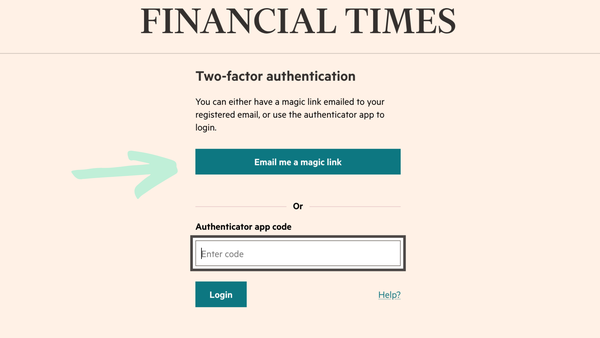
Step 1: Log in to Subscription Manager
Go to subscription-manager.ft.com and log in. Two-factor authentication keeps the data held in Subscription Manager secure, so you’ll need to either request a validation link to be sent to your email, or use an authenticator app.
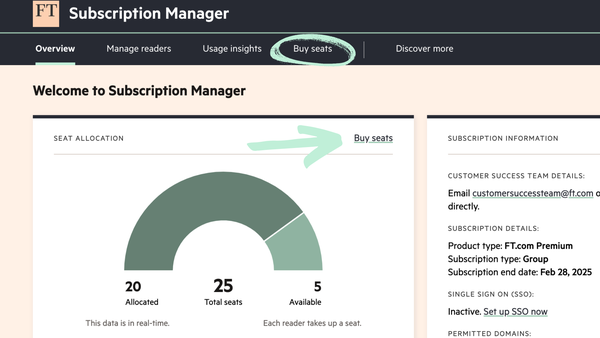
Step 2: Select the ‘Buy seats’ option
If your subscription is full or nearing capacity select the ‘Buy seats’ option in the main navigation bar or from your subscription overview.
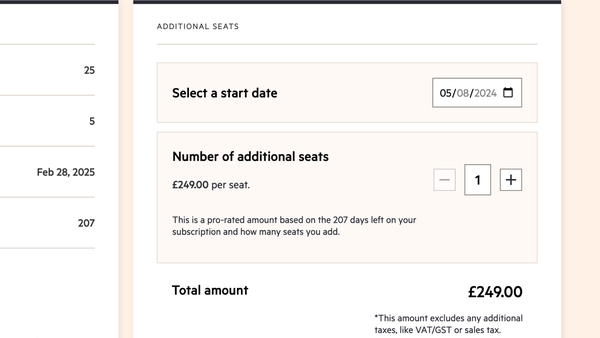
Step 3: Choose the number of seats and start date
Select how many seats you need to add and the date that access needs to start from. The price will be prorated based on the number of days left on your FT Professional Subscription.
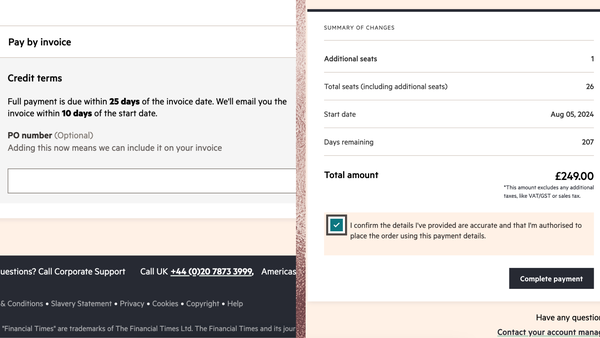
Step 4: Confirm payment
Review all the details of your purchase and select your payment method. If you currently pay for your FT Professional Subscription by invoice you’ll have to pay for additional seats by invoice as well.
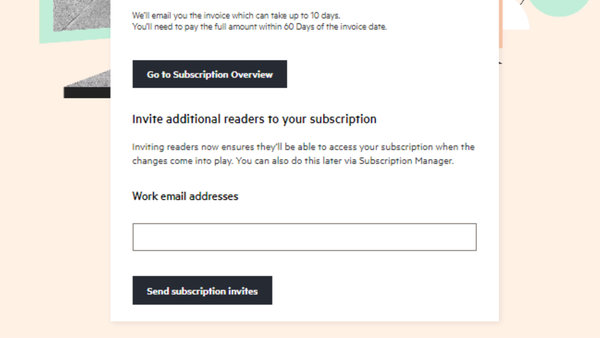
Step 5: Assign your new seats
Email a sign up link to the individuals who should be assigned your new seats. They’ll appear in your ‘pending invitations’ list in the ‘Manage readers’ tab until they set up their account.
Frequently asked questions
What do I do if I need to add more than 5 seats to my subscription?
Get in touch with your FT Professional account manager to discuss your requirements. They can talk you through the best options available to you if you’re looking to significantly expand your subscription. If you’re not sure who your account manager is, then please contact customer.success@ft.com.
Why can’t I see the option to ‘Buy seats’ when logged in to Subscription Manager?
Admins of Enterprise subscriptions that cover their entire organisation won’t see the option to ‘Buy seats’, as those types of subscription plan aren’t restricted by a seat limit.
If you’re the admin of a Team or Group subscription and don’t have the ‘Buy seats’ option, you may be in a country where we can’t currently offer this feature. There are a number of other scenarios where self-serve is unavailable, including multi-year contracts and subscriptions with access through third party channels. If you don't see the 'Buy seats' option you should contact your FT Professional account manager to add additional seats.
Can I increase our number of occasional readers if I have a Group subscription plan?
If you have a Group subscription whereby you pay for a defined number of ‘core’ readers but enable access for a wider number of ‘occasional’ readers, you won’t be able to increase your occasional reader number in Subscription Manager. Any new seats added will count and be charged for as core readers.
What else can you do in Subscription Manager?
For admins, Subscription Manager is the place to go to make sure your FT Professional Subscription is being optimised across your organisation. If you’ve recently been given admin rights or aren’t already using Subscription Manager, these features will help you manage your subscription effectively, and maximise the return on your investment in FT journalism.
Check if you’ve got any available seats to assign
Your ‘Overview’ tab clearly shows how many seats you have allocated, as well as any that are currently free. Make sure you allocate any available seats to colleagues who can benefit from the FT’s trusted news and commentary.
Identify people not using their access, and re-assign their seat
‘Usage insights’ gives you a snapshot of how your subscription is being used. Download a usage report for individual level stats. If someone isn’t using their access, you can send them a reminder or reallocate that seat to someone else.
Set up Single Sign-On and reduce login friction for your subscribers
Single Sign-On (SSO) enables your subscribers to use their existing network login details to access FT.com. SSO also helps to cut down on manual admin as leavers lose their access when they can no longer log in to your network. The SSO setup wizard in Subscription Manager allows you to set up, test and roll out an SSO connection in a few simple steps.
Switch on Advanced Sharing so subscribers can share articles with clients
The ‘Discover more’ tab promotes tools and features that are available exclusively to organisations with an FT Professional Subscription. Here you can switch on a free 30 day trial of Advanced Sharing; a tool that allows FT articles to be shared at scale outside of your organisation.
Client-facing teams particularly benefit from Advanced Sharing as they can use FT article links to spark conversations and add value to existing client relationships.
Learn more about FT Professional
FT Professional equips users with specialist knowledge and tailored insights from the Financial Times to help them make the best strategic and commercial decisions in an unpredictable global environment. Our customers get more from FT journalism through additional resources, curated news and action-oriented tools.
Help your team make better business decisions with the FT’s trusted commentary and analysis. For more information about how FT Professional can help your organisation, please get in touch.